
You’re posting consistently. Your content is getting better. Your following is slowly climbing. And then a brand slides into your DMs: “Hi! We’d love to collaborate. Can you send over your media kit?”
You freeze. You don’t have one. You’re not even 100% sure what to put in one.
This happens to a lot of creators — and it costs them deals they could have landed.
An Instagram media kit is the single most important document a creator can have when trying to work with brands. It’s not complicated. It’s not only for influencers with millions of followers. And it doesn’t require a graphic design degree to make one.
This guide covers everything: what an Instagram media kit is, what to include, how to design it, what brands actually look for, real examples broken down by niche, common mistakes to avoid, and the fastest way to create one in 2026 — without spending hours in Canva or paying a designer.
Whether you’re an Instagram micro influencer just landing your first collaboration or an established creator looking to professionalize your brand partnerships, this is written for you.
What’s Inside This Guide
- What Is an Instagram Media Kit?
- Why Instagram Creators Need a Media Kit More Than Ever
- What to Include in Your Instagram Media Kit (Section by Section)
- Instagram Media Kit Examples — What Good Ones Look Like
- How to Make a Media Kit for Instagram — Step by Step
- Instagram Media Kit Design Tips That Actually Work
- Instagram Stats That Brands Care About Most in 2026
- Instagram Media Kit for Beginners and Micro Influencers
- How to Use Your Instagram Media Kit to Land Brand Deals
- Instagram Media Kit Generator: The Fastest Way to Create Yours
- Common Mistakes in Instagram Media Kits
- FAQs About Instagram Media Kits
1. What Is an Instagram Media Kit?
An Instagram media kit — sometimes called a press kit or collaborations kit — is a professional document that Instagram creators share with brands when exploring partnership opportunities.
Think of it as the business version of your Instagram profile. Your profile shows people what you post. Your media kit shows brands why they should pay you to post.
It typically includes a short bio about you and your niche, your follower count and engagement stats, audience demographic data, examples of your best content, past brand partnerships, what collaboration formats you offer, your pricing, and how to contact you.
Some creators put it all in a PDF. Others use a shareable link. The format matters less than the content — though we’ll cover design and format in detail later.
Instagram Media Kit vs. General Influencer Media Kit
You’ll sometimes hear the terms “Instagram media kit” and “influencer media kit” used interchangeably. They’re basically the same thing, with one distinction:
An Instagram-specific media kit is built around your Instagram presence. It highlights your Instagram follower count, Instagram engagement rate, Instagram Insights data (audience demographics, reach, impressions), and your Instagram content examples.
If Instagram is your main platform — or the one where you have the strongest following — your media kit should lead with Instagram data. You can still mention other platforms, but Instagram should be front and center.
If you create content across multiple platforms, or if you’re just getting started on Instagram, check out the broader guide on influencer media kits for a full breakdown of how to structure a kit that covers all your channels.
What’s the Difference Between a Media Kit and a Rate Card?
Media kit: Your full professional profile. It introduces you, shows your audience data, demonstrates your content quality, and (optionally) mentions pricing. This is what you share first.
Rate card: A focused document listing your collaboration types and exact prices. Some creators include this inside their media kit. Others keep it separate and share it only when a brand asks.
For most Instagram creators, including a rate range directly in the media kit saves time and filters out brands whose budgets don’t align with yours.
💡 Pro Tip: Your Instagram media kit is not a static document — it’s a living pitch. Update it regularly, and make sure it always reflects your real, current numbers.
2. Why Instagram Creators Need a Media Kit More Than Ever
A few years ago, you could reach out to a brand with a casual DM, share your follower count in the body of an email, and maybe attach a few screenshots of your Insights. Some brands would still respond.
That approach doesn’t really cut it anymore.
The influencer marketing industry has grown into a multi-billion dollar space, and brands — even small ones — have become much more sophisticated buyers. They’re comparing multiple creators, evaluating engagement rates, reviewing audience demographics, and asking for proof of past results. They need professional materials to make decisions.
A well-made Instagram media kit is how you show up professionally in that context.
The Competition Is Real
There are hundreds of millions of Instagram accounts posting content. Even in niche categories, brands receive dozens — sometimes hundreds — of creator pitches for a single campaign. If you want to understand how brands choose between creators at different levels, this article on types of influencers breaks down exactly how brands think about nano, micro, macro, and mega influencers when making decisions.
When a brand manager opens their inbox and finds 40 pitches, the creators who stand out are the ones who have professional media kits. Not necessarily the biggest accounts — the most prepared ones.
You’re Running a Business
The moment you start pursuing brand partnerships, you’re running a business. Brands are potential clients. Your content is the product. Your media kit is your sales document. If you’re earlier in your creator journey and still figuring out how to build an audience that brands actually want to reach, the guide on how to become an Instagram influencer covers that side of things in detail.
It Saves You Enormous Time
Without a media kit, you answer the same brand questions over and over. Every inquiry becomes: “What’s your follower count?” “What’s your engagement?” “What are your demographics?” “What platforms do you post on?” “What do you charge?”
A media kit answers all of those questions in one document. You send one link, the brand has everything they need, and the conversation can skip straight to the deal.
It Works Even With a Small Following
This is one of the most important points in this entire guide.
You do not need 100,000 followers to have a media kit. You do not need 50,000. You do not need any specific number.
Nano influencers — those with fewer than 10,000 followers — regularly land paid brand deals because their engagement rates are high, their audiences are loyal and niche, and their cost is accessible for smaller brands. A polished Instagram media kit is often what convinces a brand to take a chance on a smaller creator over a bigger one with lower engagement.
💡 Pro Tip: If your engagement rate is above 5%, that’s genuinely impressive — no matter how many followers you have. A media kit lets you lead with that strength instead of apologizing for your follower count.
3. What to Include in Your Instagram Media Kit
Now for the practical part. Here’s exactly what your Instagram media kit should contain, section by section. We’ll cover each one in detail so you know not just what to include, but how to present it.
Section 1: Cover Page
Your cover is the first thing a brand sees. It sets the tone for everything that follows. Keep it clean and make it immediately clear who you are.
Your cover page should include:
- Your name or Instagram handle (prominently)
- A high-quality, well-lit professional photo of yourself
- Your niche in one short phrase — be specific (e.g., “Plant-Based Cooking & Nutrition for Busy Moms” is better than “Lifestyle & Food”)
- Your primary Instagram handle and a direct link to your profile
- Your website or blog URL if you have one
The cover page doesn’t need to say everything. Its job is simply to make someone want to keep reading.
Section 2: About Me Bio
This is your story, but the condensed business version. Keep it to three to five sentences. You’re not writing a novel — you’re writing a pitch.
Your bio should answer four questions quickly:
- Who are you and what kind of content do you create?
- What niche do you own, and why does it matter to your audience?
- Who specifically is your audience?
- What makes you different from the next creator in your category?
Generic bio example (don’t use this): “Hi, I’m Alex! I’m a lifestyle and wellness creator who loves sharing tips about health, food, and travel on Instagram.”
Stronger bio example: “I create straightforward, no-fluff fitness content for women over 30 who want to build strength without gym anxiety. My audience skews 28–40, predominantly in the US, and comes back consistently because the advice is real, tested, and doesn’t push unsustainable trends.”
See the difference? The second version tells a brand exactly who they’d be reaching and why you’re credible in this space.
Section 3: Instagram Stats and Platform Metrics
This is the heart of your Instagram media kit. Get these numbers right. Don’t inflate them — brands can verify everything with third-party tools in under 60 seconds.
For your Instagram account, include:
- Follower count (current, not rounded up significantly)
- Engagement rate (average likes + comments divided by followers × 100)
- Average reach per post
- Average impressions per post
- Average Reels views
- Story views (if you share Stories frequently)
- Monthly account reach or profile visits
Where to find these numbers: Go to your Instagram Professional Dashboard or Instagram Insights. Pull numbers from the last 30 days for the most accurate current representation.
If you’re active on other platforms too — TikTok, YouTube, Pinterest, a blog — include those stats as secondary data. But if Instagram is your home base, make sure your Instagram numbers are front and center.
Section 4: Audience Demographics
This section is where a lot of creators either win or lose a brand deal — and it’s the section most often done poorly.
Brands are not buying your content. They’re buying access to your audience. They need to know whether your followers match their target customer. The more clearly you can show that alignment, the easier it is for them to say yes.
Include the following demographic data from your Instagram Insights:
- Gender breakdown (e.g., 68% female, 32% male)
- Age range distribution (e.g., 18–24: 28%, 25–34: 44%, 35–44: 18%)
- Top countries (e.g., USA: 62%, UK: 11%, Canada: 8%)
- Top cities if you’re targeting local or regional brands
- Language if relevant to your niche
Present this data visually whenever possible. A simple pie chart or bar graph communicates age and gender breakdown much faster than a paragraph of numbers. Brands scan media kits — make the data pop.
💡 Pro Tip: Instagram Insights is only available if you have a Creator or Business account. If you’re still on a personal account, switch now. You need this data to build a credible media kit — and it unlocks a lot of other growth tools too.
Section 5: Content Examples
Stats tell half the story. Your actual content tells the other half.
Choose four to eight of your best Instagram posts, Reels, or Stories and include them as visual examples. Prioritize:
- Posts that performed significantly above your average (high engagement, high reach)
- Sponsored posts that show how you integrate brand mentions naturally
- Content that showcases your photography or video quality
- Variety — include a feed post, a Reel, and a Story example if possible
For each example, consider adding the engagement stats below the image. Something like “Reel: 284K views, 4.1% engagement” turns a content example into a proof point.
Section 6: Past Brand Partnerships
If you’ve worked with brands before — even on gifted (non-paid) collaborations — list them here. Brand logos are even better than just names. Seeing recognizable logos builds instant credibility.
If you have campaign results you’re proud of, this is the place for them. Specific numbers matter enormously here:
- “My sponsored Reel for [Brand] reached 520K accounts and drove 7,400 link clicks in 48 hours.”
- “A gifted collaboration post generated 1,200 comments and a 6.8% engagement rate — 3x above my account average.”
If you’re new and don’t have brand partnerships yet, skip this section for now. Don’t pad it with fake collaborations or vague mentions of products you just happen to like.
Section 7: Services and Collaboration Formats
Tell brands exactly what they can hire you for. Don’t make them guess or ask. A clear list of services removes friction from the deal-making process.
Common Instagram collaboration formats include:
- Instagram feed post (single photo or carousel)
- Instagram Reel (specify typical length: 15s, 30s, 60s, 90s)
- Instagram Stories package (specify number of frames and whether link sticker is included)
- Instagram Live appearance or brand Q&A
- Giveaway hosting
- Affiliate partnership with commission structure
- Long-term brand ambassador role
- UGC (User-Generated Content) creation for brand’s own use
- Instagram Takeover
For each service, briefly describe what’s included: How many revision rounds? What’s the turnaround time? Do usage rights come included or cost extra? Does the brand get exclusivity in the niche for a set period?
Section 8: Rates and Pricing
The pricing section is optional, but highly recommended. Here’s the honest truth about including rates in your Instagram media kit:
Including a price range saves everyone time. Brands with tiny budgets will self-select out instead of wasting your time with an offer that’s nowhere near your rate. And brands with real budgets will appreciate the transparency.
You don’t need to post exact numbers. A range works well. For example:
- Instagram Reel: $800–$1,500 depending on usage rights and exclusivity
- Feed Post + Stories package: $600–$1,000
- Long-term Ambassador: Custom pricing — enquire directly
If you’re not sure what to charge, research comparable creators in your niche. Engagement rate, follower count, niche, and audience location all factor into pricing. Beauty and fashion typically command higher rates than education or hobby niches with similar follower counts.
Section 9: Testimonials
A kind, specific quote from a brand you’ve worked with is incredibly effective. Even a single sentence like “Working with [creator] was seamless — she delivered ahead of schedule and her audience response exceeded our expectations” adds serious credibility.
If you’re just starting out and don’t have testimonials yet, skip this section. Don’t fabricate them. Real testimonials from real brands will come with time.
Section 10: Contact Information
End every media kit with clear, complete contact information. This should appear on the final page and ideally on every page or as a footer:
- Your professional email address (not your personal address — set up a creator@yourbrand.com or similar)
- Your Instagram handle with a direct link
- Your website URL
- Any other relevant social handles
- Response time expectation (“I respond to all collaboration inquiries within 24–48 business hours”)
4. Instagram Media Kit Examples — What Good Ones Look Like
Understanding what to include is one thing. Seeing how real creators structure and design their kits helps bring it all together. Let’s walk through what strong Instagram media kits look like across different niches and creator sizes.
Instagram Media Kit Example: Beauty Creator
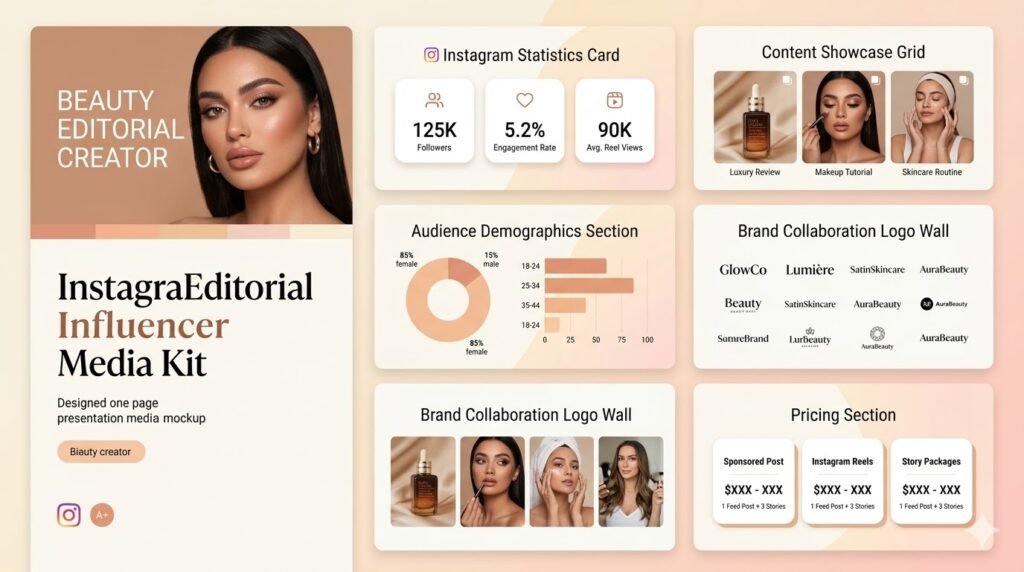
A strong beauty influencer media kit on Instagram typically leads with a visually rich, color-consistent design that mirrors the aesthetic of the creator’s feed. The best examples include:
- A bold hero image — usually a high-quality editorial-style photo of the creator
- A clean breakdown of Instagram stats front and center: follower count, engagement rate, average Reel views
- Audience demographics presented as visual graphs rather than text
- 3–4 content examples showing product reviews, tutorials, and GRWM-style content
- A logo wall of past brand collaborations (Sephora, Ulta, indie skincare brands, etc.)
- Clear pricing for sponsored posts, Reels, and Stories packages
The design usually mirrors the creator’s feed — warm tones, clean white space, or dark and editorial depending on the creator’s style. The media kit IS part of your brand presentation.
Instagram Media Kit Example: Fitness Creator
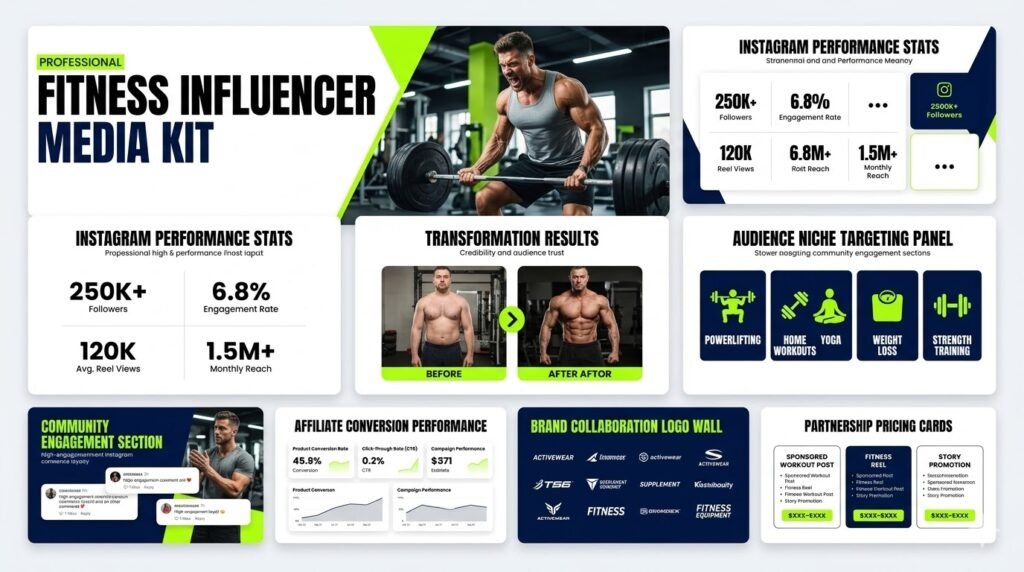
Fitness Instagram media kits tend to highlight transformation content, workout statistics, and community trust. Good examples include real before-and-after campaign results, high-engagement comments showing community investment, and clear niche targeting (powerlifting, yoga, home workouts, etc.). Brands like supplement companies and activewear labels are looking for proof that your audience actually buys products — so if you have affiliate data showing conversion rates, include it.
Instagram Media Kit Example: Food Creator
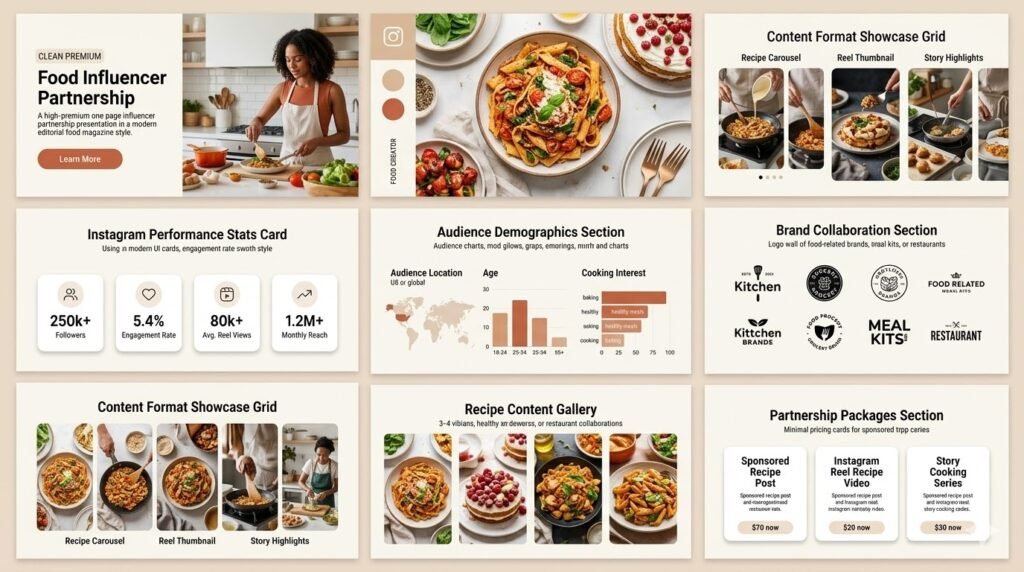
Food and cooking creators on Instagram usually have strong visual content to work with — beautiful recipe photos, process videos, and restaurant content. A good food media kit leads with that visual strength. Include content examples from different formats: feed carousels breaking down a recipe step by step, Reels showing the finished dish, and Stories showing real-time cooking moments. Audience demographics matter a lot here — brands want to know if your followers are in the US, what age group they are, and whether they’re the type to try recipes at home.
Instagram Media Kit Example: Travel Creator
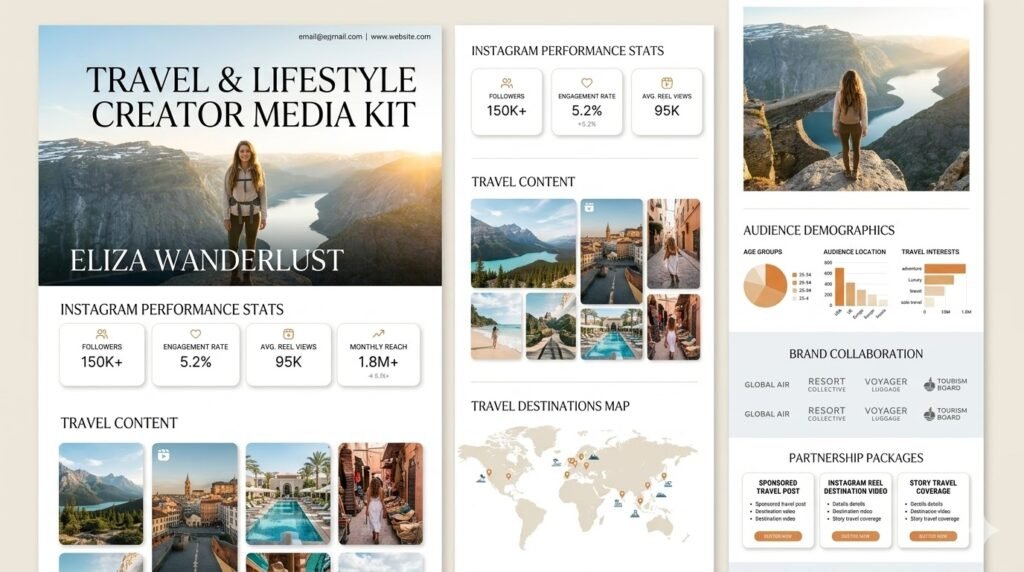
Travel Instagram media kits need to convey two things immediately: the quality of your photography and the breadth of your audience’s geographic reach. The best travel media kits include a visual grid of destination content, a clear breakdown of top audience countries, and specific campaign examples showing hotel stays, destination campaigns, or airline partnerships. If you create travel content in both English and another language, mention that — it expands your brand appeal significantly.
Instagram Media Kit Example: Micro Influencer
This is the media kit format that surprises the most people. You’d think micro influencer media kits would be thin on content — but the best ones are actually very powerful because they lean into what makes micro influencers valuable: engagement and community.
A strong micro influencer Instagram media kit leads with engagement rate (often 5–10%, which is double or triple what large accounts achieve), shows comment sections full of genuine interactions, and makes the case for why a brand gets better ROI from a smaller, more connected audience than a larger but passive one.
If you’re a micro influencer, don’t apologize for your follower count. Reframe the narrative: fewer followers, more impact per post.
Instagram Media Kit Example: Beginner Creator
If you’re new and don’t have impressive stats or brand collaborations yet, your media kit should focus on:
- Your niche expertise and why you’re credible in this space (certifications, personal story, lived experience)
- Your engagement rate, even if followers are modest
- High-quality content examples that show what your sponsored posts could look like
- Audience demographics showing a clear, targetable niche
- Growth trajectory — if you’ve grown 40% in three months, say that
Every creator who now has 200,000 followers once had 2,000. Brands know that. Some brands specifically seek out emerging creators to grow alongside. A polished, honest media kit can get you in the door.
📌 Note: You don’t need to include every section if you’re just starting. A clean, honest kit with three or four strong sections beats a bloated kit with padding and fabricated claims every time.
5. How to Make a Media Kit for Instagram — Step by Step
You know what goes in a media kit. Now let’s talk about how to actually put one together. Here are your main options.
Option A: Build It in Canva
Canva is the most popular tool for creating Instagram media kits from scratch. It’s free, has a solid library of influencer media kit templates, and lets you customize colors, fonts, and layout to match your brand.
The process:
- Go to Canva and search “influencer media kit” in the template library.
- Pick a template that matches your aesthetic.
- Replace the placeholder text and images with your own information.
- Pull your stats manually from Instagram Insights and type them in.
- Export as a PDF and share it via email or Google Drive link.
Canva Instagram media kit — the honest trade-off: It looks good and it’s free. But you’re pulling all your stats manually, which takes time. And every time your follower count grows or your engagement rate changes, you have to go back in and update it. For a creator who’s actively pitching brands, that maintenance adds up.
Option B: Use a Pre-Made Instagram Media Kit Template
Platforms like Etsy sell Instagram media kit templates for anywhere between $5 and $30. You get a professionally designed file (usually in Canva or Adobe formats) that you customize with your own information. This saves design time but still requires manual stat updates.
If you want a Canva Instagram media kit template that’s already designed and just needs your information dropped in, this is a fast and affordable shortcut.
Option C: Hire a Designer
If you’re at a stage where your brand partnerships are generating meaningful income, hiring a designer to create a custom media kit is a worthwhile investment. A good freelancer can create something that perfectly reflects your aesthetic for $150–$500.
The upside is a completely unique, high-quality design. The downside is that you’re still responsible for keeping the content current.
Option D: Use Hyperr Manage an Instagram Media Kit Generator
This is the option that makes the most sense for most Instagram creators in 2026, especially if you want something fast, professional, and always up to date.
Hyperr is a platform built specifically for this. You create an account, connect your Instagram, and Hyperr automatically pulls your real data — follower count, engagement rate, audience demographics, reach, impressions, top content — and generates a complete, professional media kit for you. No templates to customize. No stats to enter manually. No design skills required.
The result is a live, shareable link (not a PDF) that you can send to brands anytime. When they open your link, they see your current, real Instagram data. When your stats improve, the link updates automatically.
We’ll cover Hyperr in full detail in Section 10.
Step-by-Step: Building Your Media Kit
- Collect your Instagram stats from your Insights dashboard (follower count, engagement rate, reach, impressions, demographics).
- Write your bio — three to five sentences, specific and authentic.
- Choose your best content examples — select four to eight posts that show your range and quality.
- List your services — every collaboration format you’re willing to do, with brief descriptions.
- Set your pricing — research comparable creators and set an honest rate range.
- Design or generate — use Canva, a template, or Hyperr to create the visual document.
- Get a shareable link — a direct link is almost always better than a PDF attachment.
- Test it on mobile — open your kit on your phone and make sure it’s readable.
- Set a monthly reminder to update your stats.
6. Instagram Media Kit Design Tips That Actually Work
Design doesn’t have to be complicated. But it does have to be intentional. Here are the design principles that make the biggest difference in how brands perceive your media kit.
Match Your Media Kit to Your Instagram Aesthetic
This is the most important design principle for Instagram creators specifically. Your media kit should look like it came from the same creative world as your Instagram feed.
If your feed is bright, airy, and minimal — your media kit should be bright, airy, and minimal. If your content is dark, moody, and editorial — bring that to your kit. If you post colorful, bold, energetic content — let your kit reflect that energy.
Brands hire you for your aesthetic. Let them see it before they’ve even scrolled through your profile.
Use Your Brand Colors and Fonts Consistently
Pick two to four colors that reflect your visual brand and use them throughout every page of your kit. Pick one or two clean fonts — one for headers, one for body text. Consistency signals professionalism. Inconsistency creates visual noise and makes brands doubt your attention to detail.
Lead With Numbers That Can’t Be Missed
Your most impressive stats — engagement rate, monthly reach, follower count — should be displayed as large, bold callout numbers, not buried in a paragraph. Use the visual hierarchy to draw the eye to your best data immediately.
If your engagement rate is 6.2%, that should be the first number a brand sees when they open your kit. Not in a sentence. As a bold, large-font data point that stops them in their tracks.
Keep It Short and Visual
Most brand managers spend less than 90 seconds reading a media kit on first review. They scan. They look for numbers. They look at images. They decide whether to keep reading.
This means: less text, more visuals. Replace paragraphs with bullet points. Replace bullet points with icons and data callouts. Replace text demographic data with simple charts.
A two to three page media kit that’s clean and visual will outperform a seven page kit with walls of text every single time.
Use Real Photos, Not Stock
Every image in your Instagram media kit should be your own original content. This sounds obvious but a surprising number of creators pad their kits with stock photography to fill space. Brands will immediately notice the disconnect between the stock images in your kit and the actual content on your profile. Use screenshots of your real posts, real content thumbnails, and a real professional photo of yourself.
Make It Work on Mobile
A lot of brand managers are reviewing creator materials on their phones. A PDF that looks beautiful on a desktop but requires pinching and zooming to read on a phone is a frustrating experience that reflects poorly on you.
If you’re using a link-based media kit (like one generated through Hyperr), this is handled automatically — the page is responsive and looks great on any screen. If you’re using a PDF, open it on your phone before you start sending it anywhere.
Put Contact Info Everywhere
Your professional email and Instagram handle should appear on the cover page and on the final page at minimum. Ideally, they should appear in a small footer on every page. Brands often screenshot specific pages of media kits — make sure your contact information travels with any page they pull out.
7. Instagram Stats That Brands Care About Most in 2026
Instagram creator statistics are not all created equal. Brands have learned — often through expensive experience — which numbers actually predict campaign performance and which are just vanity metrics.
Here’s how brands actually evaluate Instagram data when reviewing media kits.
Engagement Rate: The Most Important Number
If there’s one metric to optimize for and showcase prominently in your Instagram media kit, it’s engagement rate.
Engagement rate measures how actively your audience interacts with your content. It’s calculated by taking your average likes and comments per post, dividing by your follower count, and multiplying by 100.
Why brands prioritize this: A high engagement rate tells brands that your followers are real people who actually pay attention to your content — not bots, ghost followers, or people who scrolled past you once and forgot to unfollow.
General benchmarks for Instagram in 2026:
- Under 1% — Below average. Brands will notice this.
- 1–3% — Average for accounts with 100K+ followers
- 3–6% — Good. Solid foundation for brand partnerships.
- 6–10% — Excellent, especially for mid-size accounts
- 10%+ — Outstanding. Typically nano/micro influencers with highly engaged niche communities
If your engagement rate is strong, lead with it. Don’t bury it. Make it the first number brands see when they open your kit.
Audience Demographics — The Deal-Maker or Deal-Breaker
This is the second most important data set in your Instagram media kit. Here’s why:
A brand selling skincare products targeted at American women aged 25–40 doesn’t just want an Instagram creator with good engagement. They need an Instagram creator whose audience is primarily American women aged 25–40. If your audience is 80% teenage males in Southeast Asia, you’re simply not the right fit — regardless of your follower count or engagement rate.
Accurate, detailed audience demographics help brands quickly determine fit. The more specific and honest your data, the better. Don’t round your numbers significantly or cherry-pick favorable demographics from a single week that’s not representative of your baseline.
Reach and Impressions
Reach tells brands how many unique accounts saw your content. Impressions tell them how many total times content was seen (including people who saw it multiple times). Both matter, and both come directly from Instagram Insights.
For sponsored content evaluation, reach is the more relevant metric — brands typically pay for unique eyeballs, not repeated views from the same account.
Follower Count — Context Matters
Follower count still matters, but not in isolation. A creator with 12,000 highly engaged, niche-specific followers can be more valuable to the right brand than a creator with 180,000 passive, broadly dispersed followers.
Include your follower count clearly in your media kit, but always pair it with your engagement rate. Follower count without engagement rate is like listing your height without any other context — it’s a number without meaning.
Story Views and Reel Views
For Instagram specifically, average Story views and average Reel views are increasingly important metrics as the platform shifts toward video-first content.
If your Reels consistently outperform your average reach, highlight that. If your Stories have unusually high view retention or poll response rates, mention it. Brands running Story-specific campaigns will weight these numbers heavily.
Past Campaign Performance
If you’ve run brand campaigns before and tracked results, include those numbers. Specific campaign results — reach, engagement, link clicks, conversions — are the most persuasive data you can include in any Instagram media kit.
The reason brands care so much about this kind of evidence is related to what they’re ultimately trying to achieve. If you want to understand the business side of why brands invest in Instagram creator partnerships at all, this article on how influencer marketing helps brands grow explains the value equation from the brand’s perspective.
8. Instagram Media Kit for Beginners and Micro Influencers
This section is specifically for creators who are newer to the brand deal space: those with smaller followings, limited or no prior brand partnerships, or both. The questions that come up most often are: “Is it worth making a media kit if I only have a few thousand followers?” and “What do I put in a media kit if I’ve never worked with a brand?”
Let’s answer both directly.
Is a Beginner Instagram Media Kit Worth Making?
Yes. Fully and completely yes.
Here’s the reality: the gap between creators who land brand deals and creators who don’t often has nothing to do with follower count. It has everything to do with how professional and prepared they seem when a brand reaches out.
A beginner Instagram creator with 3,500 followers who sends a clean, professional media kit will frequently out-pitch a creator with 25,000 followers who responds with a screenshot of their Insights and a casual “let me know if you want to work together” DM.
Preparation signals professionalism. Professionalism signals reliability. Reliability is exactly what brands want in a creator partner.
What to Put in a Beginner Instagram Media Kit
If you don’t have brand partnerships yet, here’s how to structure your kit:
Lead With Engagement, Not Followers
If you have a small following but strong engagement — which is very common for newer creators with niche audiences — put that engagement rate front and center. A 9% engagement rate on 4,000 followers is genuinely impressive and brands know it.
Show Your Niche Clearly
The narrower and more specific your niche, the more valuable you are to the right brand. “Vegan recipes for college students on a budget” is more actionable for a brand than “food content.” Own your specific corner.
Create a Spec Post
If you haven’t done sponsored content before, consider creating what’s called a “spec post” — a content piece that looks like a natural brand integration but is created without a paid deal, just to demonstrate what your sponsored content would look like. Use a product you genuinely use and love. Show how you’d naturally feature it in your content style. This gives brands a concrete preview of what working with you would produce.
Show Your Community
Genuine community engagement is incredibly valuable and often underrepresented in beginner media kits. Include screenshots of comments that show real conversation, poll response rates from Stories, or DMs from followers asking product questions. This kind of authentic community proof is something larger accounts with passive audiences simply cannot replicate.
Be Honest About Where You Are
Don’t fake past partnerships or inflate your stats. Some brands specifically seek out emerging creators for lower-cost campaigns with potentially higher organic feel. Be straightforward about being a growing creator who takes their content and brand relationships seriously.
Pricing as a Beginner or Micro Influencer
Pricing is always awkward when you’re starting out. Here’s a basic framework:
- Nano influencer (1K–10K): Instagram feed post $50–$250, Reel $75–$350
- Micro influencer (10K–50K): Instagram feed post $200–$600, Reel $300–$800
- Micro influencer (50K–100K): Instagram feed post $500–$1,200, Reel $700–$1,800
These are rough ranges. Your niche, engagement rate, and the specific brand’s campaign goals all influence the final number. Don’t start conversations by apologizing for your rates. Know your worth, present it clearly, and negotiate from there.
💡 Pro Tip: If a brand truly can’t meet your rate, consider asking for an increased gifted value, affiliate commission, or usage fee in lieu of a flat fee. Sometimes a creative compensation structure works better than walking away entirely.
9. How to Use Your Instagram Media Kit to Land Brand Deals
Having a media kit is one thing. Using it strategically to actually secure paid partnerships is another. Let’s talk about the practical side of getting your media kit in front of the right people and converting those conversations into deals.
Always Have It Ready to Send
This sounds obvious, but a lot of creators don’t have their media kit easily accessible when a brand reaches out. You shouldn’t have to dig through your downloads folder every time. Your media kit should be:
- Saved as a link you can copy-paste instantly from your phone
- Linked in your Instagram bio (directly or via a link-in-bio page)
- In your email signature
- Ready to attach or link in a pitch email within 30 seconds
Tailor It When Possible
Your general media kit is your baseline — the document you send in most situations. But for high-value pitches or brands you really want to work with, consider customizing it slightly. Move relevant content examples to the front. Lead with the stats that matter most for their specific product category. Remove sections that aren’t relevant to their campaign type.
This extra effort signals to a brand that you’ve thought about their specific needs, not just sent a generic pitch to 50 companies. It can make a meaningful difference in conversion rate.
Lead Your Email Pitch With a Hook, Not Your Stats
When you reach out to a brand, your opening email should catch their attention with a relevant insight or genuine connection before getting into stats and media kit links.
Instead of: “Hi, I’m a creator with 28K followers and a 5.4% engagement rate. Please see my media kit attached.”
Try: “Hi [name], I’ve been following [Brand] since you launched your latest skincare line last spring — I actually used [product] as the basis for a Reel about building a simplified morning routine, which became one of my best-performing posts this year. I’d love to explore what a paid partnership could look like. I’ve attached my media kit for reference.”
The second approach shows you know the brand, you’ve organically used their product, and you’re thinking about how to create content that works for both your audience and their goals. The media kit follows as supporting evidence, not as the lead.
Include Your Media Kit Link in Your Bio
Many brand discovery processes start with a brand finding your profile organically or through a search — not through a cold outreach. If a brand manager lands on your profile and wants to know more, make it easy for them to access your media kit immediately. A link-in-bio tool that includes a “Media Kit” button is a small detail that can generate inbound partnership interest without any active outreach.
Follow Up Professionally
If you’ve sent a pitch with your media kit and haven’t heard back after a week, one follow-up email is completely appropriate. Keep it short, friendly, and professional. Don’t apologize or grovel. Just check in: “Hi [name], following up on my note from last week — happy to answer any questions about my audience or content approach if that would be helpful.”
One follow-up, not five. Persistent but not pushy.
Track Who You’ve Sent It To
Keep a simple spreadsheet or note tracking which brands you’ve sent your media kit to, when you sent it, and the outcome. This helps you follow up appropriately, track your pitch success rate, and identify patterns in which brands respond well versus those that don’t.
10. Instagram Media Kit Generator: The Fastest Way to Create Yours
By now you understand exactly what your Instagram media kit needs and why it matters. Let’s talk about the fastest, most accurate way to actually create one.
The challenge with most methods — Canva templates, designer-built PDFs, DIY tools — is that they require manual data entry and ongoing manual updates. For a creator who’s actively managing a growing Instagram presence, that maintenance overhead is a real problem.
What you actually want is a media kit that:
- Pulls your Instagram data automatically — no copying from Insights
- Stays current as your stats change — no manual updates
- Lives at a shareable link — not a PDF that goes stale
- Looks professional — without requiring any design work from you
- Works on every device — desktop, phone, tablet
That’s what Hyperr does.
What Is Hyperr Manage?
Hyperr is a creator tool built specifically for Instagram influencers who want to generate professional media kits without spending hours on design or data entry.
The concept is intentionally simple: you create an account, connect your Instagram, and Hyperr generates your complete media kit automatically. Your follower count, engagement rate, audience demographics, reach, top-performing content — all pulled directly from your account and presented in a clean, brand-ready format.
You get a unique shareable link that you can put in your Instagram bio, include in pitch emails, and share with brands anytime. When brands open your link, they see your real, current Instagram data. When your stats change, the link updates automatically.
No Canva. No PDF exports. No remembering to update your follower count next month. Just a link that always works.
How to Create Your Instagram Media Kit With Hyperr Manage
- Go to Hyperr and create your account — takes less than two minutes.
- Connect your Instagram account — one-click authorization through Instagram’s official API.
- Hyperr automatically pulls your data — follower count, engagement rate, reach, impressions, audience demographics, and your top content are all populated instantly.
- Your media kit is generated — professionally formatted and ready to share.
- Copy your unique link — share it anywhere: email pitches, your Instagram bio, link-in-bio tools, wherever brands might reach you.
Why Hyperr Is Different From Other Instagram Media Kit Tools
Real Data, Not Manual Entry
Because Hyperr connects directly to your Instagram through the official API, every number in your media kit is accurate and verified. No rounding up your follower count. No guessing at your engagement rate. No forgetting to update the demographics section. The data is real and it’s automatic.
Always Up to Date
This is the feature that creators appreciate most after they start using it. The moment you previously struggled with manual media kit maintenance — “I need to update this before I send it to that brand” — disappears entirely. Your Hyperr media kit is always current.
A Live Link, Not a Static File
A PDF is frozen in time. The moment you export it, it starts getting outdated. A link is always live. Brands who open your Hyperr link tomorrow will see today’s numbers, not the numbers you had three months ago when you exported a PDF.
This matters more than it might seem. Brands often save creator links and come back to them weeks or months later when a campaign opens up. With a live link, they see your current, improved stats — not old numbers that no longer represent you.
Instagram-Native
Hyperr is built specifically for Instagram creators. The data points it highlights, the way audience information is presented, and the overall structure of the media kit are all optimized for the way brands evaluate Instagram partnerships specifically. It’s not a generic media kit builder that happens to include an Instagram follower count field.
Hyperr Manage Is Built For
Hyperr is designed for Instagram creators at every level — from a beginner with 2,000 followers building their first professional presence to an established micro influencer managing a steady flow of brand partnerships. If Instagram is your primary platform and you’re serious about working with brands, Hyperr gives you the professional media kit foundation you need to show up credibly in every brand conversation. And if you’re still figuring out how to build that following in the first place, this guide on how to become an Instagram influencer covers the content strategy and growth side of the equation.
Getting Started
Create your Hyperr media kit at hyperrvolt.com. Log in with your email, connect your Instagram account, and your professional media kit will be live and shareable in a matter of minutes. No design work, no data entry, no maintenance. Just a professional link you can send to any brand, any time.
💡 Pro Tip: After you create your Hyperr media kit, add the link directly to your Instagram bio. Inbound brand inquiries often start with someone finding your profile — make it effortless for them to access your kit without needing to reach out first.
11. Common Mistakes in Instagram Media Kits
Even well-intentioned creators make mistakes when building their Instagram media kits. These are the most common ones, and how to avoid them.
Mistake 1: Using Outdated Stats
Your Instagram numbers change constantly — sometimes significantly from month to month. A media kit with numbers from six months ago isn’t just inaccurate; it’s a red flag that suggests you’re not actively managing your business. Update your stats at minimum every 30 days, or use Hyperr so they update automatically.
Mistake 2: Inflating Your Numbers
Bought followers. Engagement pods artificially boosting likes. Cherry-picked stats from one viral week that doesn’t represent your normal performance. Brands use third-party tools — HypeAuditor, Modash, SocialBlade — to check creators before signing deals. Getting caught inflating your stats doesn’t just cost you one deal. It can permanently damage your reputation in the influencer marketing community, and that community is smaller than you think.
Be honest. Your real numbers, presented clearly and professionally, are almost always enough.
Mistake 3: Listing Every Platform Whether You’re Active or Not
Some creators pad their kits by listing every social platform they technically have a profile on — even platforms they haven’t posted to in a year. This backfires. A brand sees your Instagram Insights (impressive) and then sees “Pinterest: 43 followers” and “YouTube: 12 subscribers,” and the perception of your overall presence shrinks. Only include platforms where you’re actively creating and have meaningful numbers.
Mistake 4: Too Much Text, Not Enough Visual
Instagram is a visual platform. Your Instagram media kit should reflect that. Blocks of text explaining your audience and niche are much less effective than clean stats callouts, visual demographic charts, and strong content examples. If your media kit reads like an essay, it needs to be redesigned.
Mistake 5: No Clear Call to Action
Your media kit should end with a clear invitation to take the next step. Something like: “Ready to explore a partnership? Reach out at [email]. I respond to all brand inquiries within 48 hours.” Without a call to action, a brand reads through your kit and thinks “great” and then… does nothing. Give them a clear next step.
Mistake 6: Wrong Contact Information
This sounds too basic to be a real problem, but it happens: typos in email addresses, outdated phone numbers, broken website links. Test every link and every contact method before your media kit goes out.
Mistake 7: Being Too Generic
“I create lifestyle content” is not a niche. “I’m passionate about sharing my life” is not a value proposition. “I work with brands across many industries” is not a strength. Generic language in an Instagram media kit reads as someone who hasn’t thought clearly about what they offer. Define your niche specifically, know your audience specifically, and speak to brands specifically. The creators who stand out are the ones who are the most clear about exactly who they are and who they reach.
Mistake 8: Sending a Media Kit That’s Not Mobile-Optimized
One final check before you start sending your kit anywhere: open it on your phone. Is it readable? Do the images load properly? Are the stats visible without zooming? If you’re using a PDF, this is especially important. If you’re using a link-based kit like Hyperr, you’re already covered — the format is automatically responsive.
FAQs
What is a media kit for Instagram?
An Instagram media kit is a professional document or shareable page that Instagram creators send to brands when exploring partnership opportunities. It typically includes your Instagram bio and niche, follower count, engagement rate, audience demographics, content examples, past brand collaborations, services and pricing, and contact information. It’s essentially your business profile — everything a brand needs to decide whether to work with you, all in one place.
How do I make a media kit for Instagram?
You have several options: use a Canva Instagram media kit template (free, manual data entry required), purchase a template from Etsy or similar, hire a freelance designer, or use an Instagram media kit generator like Hyperr. Hyperr is the fastest option for Instagram creators — you connect your account and your media kit is automatically generated with your real data in minutes.
What should be in an Instagram media kit?
The essential elements are: a cover page with your name, photo, and niche; a bio of two to four sentences; your Instagram stats (follower count, engagement rate, reach, impressions); audience demographics (age, gender, location); content examples (your best performing posts and Reels); past brand partnerships if applicable; a list of services you offer; your pricing or rate range; and your contact information.
Do I need a media kit if I only have 5,000 Instagram followers?
Yes. Having a media kit at any follower count signals professionalism and makes you stand out from the many creators who don’t have one. Brands working with smaller creators still want to see organized, professional materials. A well-made media kit can get a nano influencer with 5,000 followers a paid deal over a disorganized creator with 50,000.
What is a good engagement rate to put on an Instagram media kit?
For Instagram in 2026, an engagement rate above 3% is generally considered good. Above 5% is excellent. Above 8% is outstanding — typically achieved by nano and micro influencers with highly engaged niche communities. If your rate is above average for your follower tier, highlight it prominently.
Is a Canva Instagram media kit template good enough?
Canva templates can produce very professional-looking media kits, and many successful creators use them. The main limitation is maintenance — you have to update all your stats manually every time they change. For a creator who’s actively pitching brands, this can become time-consuming. Tools like Hyperr solve this by pulling your Instagram data automatically and keeping your kit current.
What is an Instagram media kit AI generator?
Some platforms offer AI-assisted media kit creation tools that help generate the layout or copy based on your inputs. Hyperr goes further than a generic AI tool — it actually connects to your Instagram account and pulls your real, verified data to generate an accurate media kit automatically. It’s built specifically for Instagram creators, not a general-purpose AI tool.
Can I create an Instagram media kit just by entering my username?
Some tools advertise this capability — entering a username and generating a kit from public data. Be cautious with these. Public data only shows follower count and basic post engagement. It can’t access your Instagram Insights, which means audience demographics, reach, and impressions — the most important data for brand partnerships — won’t be included. Hyperr connects to your actual account through the official Instagram API so your kit includes complete, verified Insights data.
Should my Instagram media kit be a PDF or a link?
A shareable link is generally better than a PDF for several reasons: it’s always up to date (a PDF goes stale the moment you save it), it’s mobile-friendly, it doesn’t require the recipient to download anything, and some tools let you track views. PDFs work fine in certain situations — some brands specifically request them — but a live link as your primary format is a stronger choice in 2026.
How often should I update my Instagram media kit?
At minimum, update your stats every 30 days. Update your content examples every quarter or after completing a notable brand campaign. If you use Hyperr, your stats update automatically and you only need to manually refresh your content examples and bio periodically.
What Instagram stats should I highlight most?
Priority order: engagement rate first (the most important metric), followed by audience demographics (age, gender, location), then reach and impressions per post, then follower count. Also include average Reel views if you create Reels, and Story view rates if Stories are a core part of your content strategy.
Do I need a media kit if brands approach me first?
Yes — actually, especially then. When a brand approaches you, they’re already interested. A professional media kit makes it easy for them to move forward quickly with accurate information and builds confidence that you’ll be easy and reliable to work with. Don’t make an interested brand chase down your stats in a thread of DMs.
Final Thoughts
We’ve covered a lot of ground. But the core message is simple.
An Instagram media kit is not a luxury item for famous creators. It’s a basic professional tool for any Instagram creator who takes brand partnerships seriously — at any following size, at any niche, at any stage.
It tells brands who you are without you having to repeat yourself every time. It shows them your audience data in a way that’s easy to evaluate. It demonstrates your content quality. It communicates your rates. And it signals — through its very existence — that you’re a professional who takes this work seriously.
The creators who consistently land brand deals aren’t always the ones with the biggest followings. They’re the ones who show up prepared. A clean, professional Instagram media kit is one of the most powerful ways to show up prepared.
Here’s a quick summary of what matters most:
- Your Instagram media kit should include a bio, Instagram stats, audience demographics, content examples, past partnerships, services, pricing, and contact info.
- Engagement rate and audience demographics are the two things brands care about most — put them front and center.
- Design should match your Instagram aesthetic — your kit is itself a piece of brand presentation.
- Keep it short, visual, and mobile-friendly.
- Avoid outdated stats, inflated numbers, and generic language.
- Micro and nano influencers should lead with engagement rate and community quality — follower count is not the whole story.
- Hyperr is the fastest way to create a professional, always-updated Instagram media kit — connect your account and get a shareable link in minutes.
Your Instagram media kit is your first move. Make it count.
Create your Instagram media kit in minutes with Hyperr. Sign up, connect your Instagram, and get a professional shareable media kit link instantly — no design work required.