If you run a café, dine-in, or small diner, you’ll likely experience one thing every day: traditional printed menus on tables can be more of a headache than a convenience. During the weekend rush, when tables are packed, the first thing you run out of is menu cards. A customer might be waving for a menu from a corner table, while at another table, children have ruined the menu by spilling sauce or water on it.
The biggest hassle comes next: the cost of the entire menu book as soon as raw materials become expensive and you need to increase the price of a dish by just $1 or $2. If you don’t reprint, you have to reprint the entire menu book, which ruins the look of any good outlet. Then, in the evening, if the kitchen runs out of a particular dish, the staff has to go to every other table and explain that the item is out for the day.
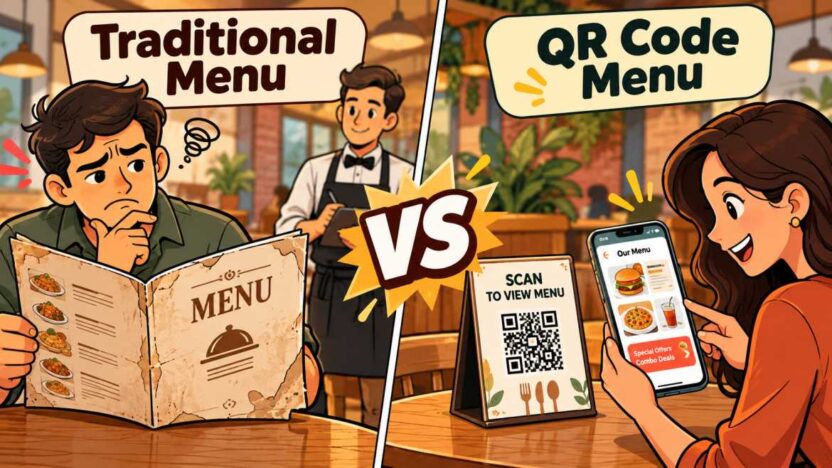
This is where the debate between a QR code menu and a traditional menu begins among restaurant owners. Today, with every customer carrying a smartphone, a modern digital QR menu is proving to be a very sensible alternative to bulky cardboard menus. Instead of placing a cardboard book on the table, a small code allows customers to scan the menu as soon as they sit down, view the latest prices, and you can update your dishes from your phone at will, all without spending a single dollar.
In this digital menu vs. physical menu battle, can a QR code menu for restaurants truly replace the old paper menu, or do both have their own place? Let’s weigh them both from a practical perspective.
What Is a QR Code Menu?
Simply put, a QR code menu is a digital version of your restaurant menu that customers can access directly on their smartphones without downloading any apps. A small, black-and-white square code is placed on your dining table or billing counter. Once a customer opens their phone’s camera and scans it, all your dishes, their photos, and the latest prices appear on their mobile screen.
It’s not just a plain photo or PDF file. A proper digital QR code menu for restaurant works like a live website, automatically adjusting to the mobile screen. Customers don’t need to zoom the screen. They can easily browse through the different sections—such as breakfast, starters, main course, drinks, and desserts—with their fingertips.
In today’s world, when most people prefer to work from their phones, a QR code menu for restaurants makes table service much easier. Customers browse the entire variety at their own pace, understand if a dish needs customization, and in many systems, they can even send their order directly from the table to the kitchen. From a restaurant owner’s perspective, this is a modern way to eliminate the hassle of printing menu cards, torn pages, and daily price changes.
What Is a Traditional Restaurant Menu?
A traditional restaurant menu is the familiar paper or cardboard card we’ve seen in restaurants and diners for years. The first thing a waiter hands you as soon as you sit down at your table is this menu. It comes in many forms, from a simple laminated sheet to a heavy leather-covered booklet.
The primary function of this traditional printed menu is to provide customers with a one-stop view of your outlet’s dishes, their prices, and the cafe’s specialties. Many fine-dining restaurants design it in a premium way to match their interiors and brand image. Holding a menu card in hand, flipping through its pages and choosing dishes together with friends or family has been a natural part of dining for years.
But a physical menu also comes with certain limitations. It’s completely ‘fixed.’ Meaning, once it’s printed and arrives at your table, you can’t easily change even a full stop. If an ingredient in the kitchen becomes expensive or the chef adds a new dish, you have to go through the hassle and expense of reprinting to update this paper menu.
QR Code Menu vs Traditional Menu: Key Differences
When we compare QR code menus versus traditional menus, the difference isn’t just about technology, but also about the day-to-day operations of a restaurant. On one hand, you have the time-tested, paper-based method, and on the other, a fast and flexible digital system. Let’s break down the practical differences between the two in a few simple points:
| Aspect | Traditional Printed Menu | Digital QR Menu |
|---|---|---|
| Menu Updates | Reprinting can cost $100–$300 | Update for free in seconds through a dashboard |
| Out-of-Stock Items | Staff must inform customers at the table | Remove unavailable items instantly with one click |
| Offers and Combos | Fixed pages make changes difficult | Display live banners, combo deals, and special offers |
| Maintenance and Cleaning | Menus can tear, get wet, and require frequent replacement | Set up a QR code stand once and manage the menu digitally |
| Customer Waiting Time | Customers may need to wait for a waiter to bring the menu | Customers can browse the menu on their phones as soon as they sit down |
Freedom and cost of menu updates
The biggest headache with a traditional printed menu is that it freezes as soon as it’s printed. If the price of chicken or coffee beans increases and you need to increase the rate by just $0.50 or $1, you’d either spend $150 to $200 reprinting 50 menu cards or resort to scribbling with a pen. Meanwhile, with a digital QR menu, you can change rates instantly, add new dishes, and remove items that have run out from the kitchen, all from your phone, without any expense.
Customer Waiting and Table Turnaround
During peak hours, the first thing a customer does after settling down is look for a waiter to hand them a menu card. Often, it takes 10 to 15 minutes just to review the menu and have the waiter take their order. In contrast, a QR code menu for restaurants doubles the speed of service. Customers scan the code as soon as they sit down and select their desired dishes. This significantly improves table turnaround time and the time between emptying tables and seating new customers.
Promoting Special Deals and Combos
Everything is printed the same way on a paper menu. If you want to sell a chef-special pasta or today’s fresh muffin, the waiter has to go to each table and tell them individually. But in this race between digital menus and physical menus, digital menus have the upper hand because they act as salespeople themselves. A banner for a combo—such as a burger with fries and a Coke—appears on the menu’s homepage, and customers readily add it to their cart.
Dining Feel and Customer Comfort
The old menu also has a strong point. Some customers—especially older customers or those who prefer a quiet dinner away from screens—find a unique comfort in having a menu card in their hands. They may find it cumbersome to pull out their phone and turn on the camera. So, while digital menus are ideal for speed and the youthful, some cafes keep two or three traditional menu cards on the counter as a backup to ensure that all types of customers feel comfortable.
Benefits of Using a QR Code Menu for Restaurants
If you look closely at the daily operations of a restaurant or café, even small obstacles can quickly become major problems. Missing a menu card, having an incorrect order note, or paying an extra printing bill—these are all things that consume both time and money daily. This is why everyone from small diners to busy cafés is shifting to QR code menus for restaurants.
Let’s delve into its concrete benefits and how it benefits both your restaurant’s revenue and business.
Completely Eliminate Printing and Reprinting Expenses
Menu cards printed once in a restaurant don’t last for years. Every two or three months, a price change occurs, the chef adds a new dish, or the pages get bent and dirty. Printing 50 high-quality menus means a flat bill of $150 to $250 each time. With a digital QR menu, this entire expense is permanently zeroed out. Whenever you want to increase the price of a burger from $8 to $9, you simply go to the dashboard and change the price without spending a single dollar from your pocket.
Faster Table Turnaround and Reduced Staff Burden
During the lunch or dinner rush, staff don’t have time to breathe. Waiters often bring menus to tables, then return 10 minutes later to ask for orders—wasting a lot of time for the table. A modern QR code menu system reduces this hassle by half:
- As soon as a customer sits down, they scan the code themselves without waiting for a waiter.
- The entire menu opens instantly on their phone, allowing customers to choose their choice without hesitation.
- The staff’s job is simply to bring hot food from the kitchen to the table.
When it takes less time to browse the menu and place an order, customers finish their meal faster, giving you more time to set the next table.
Real-Time Control: What’s Out Is Out Immediately
The worst situation in a restaurant is when a customer spends 10 minutes perusing the menu, finds a dish they like, and the waiter comes and says, “Sorry, sir, it won’t be made today.” The customer’s mood is off right there. But with an online menu with a QR code, you have complete control. As soon as the kitchen runs out of mushrooms or paneer, you can hide that item from the screen with a single tap of your phone. The customer will only see the dish the kitchen can actually make.
Customers Order More Dishes and Sides
When people look at a paper menu, they often choose items they already know. But when a clear, crispy image of crispy nachos, loaded fries, or a fresh shake appears on a digital screen, customers are more likely to change their minds. Furthermore, when you display a menu combo—like a burger and drink for $10—customers are more likely to order a larger order without having to think about it separately. This system automatically increases the average bill size slightly, without the need for any waiter-smoothing.
Table Cleanliness and Easy Maintenance
Frequently used laminated menu cards are bound to get stained with fingerprints, oil, and gravy. Handing a sticky menu to a customer is often embarrassing. A clean, compact card mounted on an acrylic stand takes up very little space on the table, gives it a modern look, and is easy to wipe down with a damp cloth.
How Hyperr Volt QR Code Menu Helps Restaurants Increase Sales
There are only two simple ways to increase revenue in a restaurant or cafe business—either new customers come in every day, or a customer already seated at a table adds $2 to $5 worth of items to their bill.
Often, restaurant owners focus solely on attracting new footfall, while the real profit lies in increasing average order value (AOV). The problem is, your waiter can’t go to every table and repeatedly say, “Sir, please have a brownie with this or add extra cheese.” Customers feel like they’re being forced to order.
This is where the Hyperr Volt QR code menu acts as a discreet and calm salesman. Without annoying the customer, it makes the ordering journey so easy and engaging that your final bill automatically increases. Let’s see how this system can increase your daily sales on the ground.
High-quality photos increase orders
Old paper menus simply listed the dish name—like “Loaded Nachos $9.” Customers would only guess based on the name.
But when you add a clear photo of the same dish on a digital QR menu, with fresh, crispy, and melted cheese, customers are instantly drawn to try it. People tend to eat what they see. Photos encourage people to order not just plain food, but also your premium and high-margin starters.
The Game of Smart Add-ons and Cross-Selling
Hyperr Volt’s system suggests the right accompaniments to a dish at the right time. Imagine this:
- A customer added an $11 crispy burger to their cart.
- A small option immediately appears at the bottom of the screen: “Add peri-peri fries for just $3” or “Cheese dip for just $1.50.”
- The customer doesn’t have to search for the menu separately; they simply add it to their cart with a single tap.
This small $2 or $3 add-on, when added to 50 tables throughout the day, can directly translate into thousands of dollars in total sales at the end of the month.
Impulse Re-ordering Made Simple
What often happens at dine-in? A customer runs out of drinks while eating or wants two extra butter naans. They then raise their hand and look for the waiter for five minutes. If the waiter is busy at another table, the customer thinks, “Come on, who’s calling? Let’s just eat.” This is where you’ve missed a direct sale.
With Hyper Volt’s restaurant QR code ordering system, the phone is always in the customer’s hand or on the table in front of them. All they need to do is tap the screen, and a $4 fresh lime or extra side is instantly delivered to the kitchen. When ordering is so easy, people tend to order again without thinking while eating and drinking.
Promote instant discounts and combos during slow hours
Every restaurant has a slow time between 3 PM and 6 PM. You can’t print a separate rate card for this time on a paper menu.
But with the right smart QR menu, you can make offers live from your phone in seconds:
- Place a live banner at the top of the menu: “3 PM to 6 PM Special—Free muffin with coffee.”
- Show a combo deal for the evening: “Pizza and mocktail combo for $14.”
When customers see a value-for-money deal on the screen, they’re sure to order something to eat along with their tea or coffee.
Faster table turnaround means more tables during peak hours
On weekend evenings, when customers are waiting in line outside, every minute counts. The old system wastes at least 15 to 20 minutes of time per table in providing menus, noting orders, and then bringing the bill.
Hyperr Volt’s QR code menu for restaurants completely bridges this gap. Customers place their orders as soon as they sit down, the food is prepared quickly, and they pay directly at the counter. If a table becomes free 15 minutes early, you can accommodate 2 to 3 additional customers in the same rush. This is the most practical way to increase sales without increasing the number of tables, just by increasing the speed of service.
Frequently Asked Questions
Is a QR code menu really cheaper for a restaurant than a traditional printed menu?
Yes, absolutely. With a paper menu, every time you increase the price of a dish by just $0.50 or $1, you have to reprint the entire menu book, which costs $100 to $250 each time. In contrast, with a digital QR menu, you can update prices and dishes in seconds from your phone or laptop without spending a single dollar.
Is it difficult for elderly or non-technical customers to operate a digital QR menu?
It’s very easy for most customers because almost everyone knows how to use their smartphone camera. Scanning the code opens the menu without downloading an app. However, it’s always a good idea to keep 2-3 traditional printed menu cards on the counter as a backup, just in case an elderly customer doesn’t want to use their phone.
Should we completely eliminate traditional menus after installing digital menus?
There’s no need to completely eliminate them initially. You can digitize the flow by installing QR code stands at 80-90% of your tables and placing some physical menu cards at the counter. As your regular customers get used to scanning them themselves at their tables, your reliance on printed menus will automatically decrease.
Will it work if the internet or Wi-Fi in the cafe is a bit slow?
Hyper Volt’s QR code menu system is very lightweight and fast-loading. It loads in seconds without any lag even on 3G or basic 4G networks. If your outlet is in a basement where network issues are common, installing a basic guest Wi-Fi router in the dining area is sufficient.
Do customers need to download a separate app to view the menu?
Absolutely not. Customers don’t need to install any heavy apps or software. They simply scan the code on the table with their phone’s standard camera or Google Lens, and the entire online menu with QR code instantly opens in their phone’s browser.
Will installing a QR code menu ordering system eliminate the work of waiters or staff?
No, this system doesn’t replace staff; it reduces their workload. During peak rush hours, waiters spend half their time carrying menus to tables, bringing them back, and noting orders. When customers place their own orders, your staff can focus on serving hot food quickly and providing better customer service, rather than writing orders.
Can we change menu rates and new dishes in the same old QR code at any time?
Yes, that’s its biggest advantage. You don’t need to constantly replace the stand or sticker on the table. Whether you change the price of a pizza or add a new drink in the back-end dashboard, the customer will always see the latest menu and updated dollar rates by scanning the same old code on the table.
Does a digital QR menu really speed up table turnaround?
Absolutely. The 15 to 20 minutes of unnecessary time spent during rush hours, searching for a menu, thinking about it, and finding a waiter, is completely eliminated. The customer places their order as soon as they sit down and clears the bill at the counter as soon as they eat. This allows you to serve 2 to 3 additional customers in the same time.
Is online payment required with a QR code menu, or can customers pay at the counter?
This is entirely up to you. With Hyperr Volt, orders are sent digitally to the kitchen, but the customer can pay at the counter using cash, card, or a digital wallet. This allows your old billing and POS systems to continue running seamlessly.
Which is better: a QR code menu or a traditional menu?
If your priority is lower costs, faster service, easier menu updates, and higher sales, a QR code menu for restaurants wins hands down. It not only saves you hundreds of dollars in printing costs, but also provides modern customers with a faster and seamless dining experience.