Remember the days of COVID? Back then, everyone started sticking QR codes on tables out of compulsion, just to avoid touching each other’s menu cards. But today, that compulsion is gone. Today, QR codes have become the backbone of any functioning restaurant. Those who manage them effectively are able to quickly clear tables and fill their stores even with a small staff.
But 90% of restaurant owners still fall into a big mistake—the “PDF trap.”
A simple QR code is stuck on the table. The customer scans it with their phone, and a massive 20 MB PDF file starts downloading on their 4G. Now the person sits hungry, waiting for network, and then zooms the screen with both fingers to find out how much a paneer tikka costs. Honestly, there’s no worse customer experience than this.
Simply put—a real QR menu isn’t just for displaying food on the phone. Its real function is:
Eliminating the wait for orders to be placed at the table.
Encouraging customers to order extras without hesitation.
Quickly handling peak-hour crowds without hiring new staff.
If your QR code isn’t doing all of this, it’s just a piece of paper stuck on a table.
In this guide, we won’t share any bookish knowledge. We’ll get straight to the groundwork: how a smart QR menu can boost restaurant sales, what essential features it should have, and how to choose the best system for your business.
Also check : How to Increase Cafe Sales Without Spending More on Marketing
Why Traditional Menus & Basic PDF QR Codes Are Costing You Money
Everyone in the restaurant queue talks about saving money—where to get cheaper vegetables, how to reduce the electricity bill. But no one pays attention to how much money that old menu card or that lifeless PDF code on the table is draining from your pocket every day.
If you think a menu is a one-time printing expense, consider the ground reality.
Paper and Laminated Menus: Money Waste and Daily Hassle
The biggest headache with paper menus is the cost of reprinting them.
The price of chicken or paneer in the market increased, the chef added a new dish, or you increased the price of two drinks by ₹20—that’s it, all the old menus are useless. Either spend thousands of rupees printing 50 new copies, or write the new rates by scratching the old card with a pen. And frankly, a menu scrawled with a pen can tarnish the reputation of any good restaurant.
Secondly—cleanliness. A menu isn’t circulated on the table for two days before it’s covered in gravy splatters, grease, and fingerprints. A customer’s mood is ruined just by holding a sticky, folded menu.
And the most embarrassing situation?
A customer has perused the entire menu and eagerly selected a dish. He calls for the waiter, places his order, and the waiter scratches his head and says, “Sorry, sir, this item is out today.”
The customer’s face falls. His first impression is ruined because you can’t immediately remove a sold-out item from a paper menu.
Basic PDF QR Code: Just a Pretense of Digital
Fed up with paper, many owners have simply pasted a simple QR code menu on the table that opens directly into a PDF. But, frankly, this is even more irritating than a paper menu.
- Customers are frustrated by zooming in: A 15-20 page PDF opens on their mobile device. The font is so small that they have to repeatedly zoom in and out with their fingers. Half the menu disappears from the screen. Why would anyone bother with such a hungry stomach?
- Utterly dumb and dull: A plain PDF can never communicate with a customer. It can’t say, “If you buy garlic bread with this pizza, you’ll get ₹30 off.” It’s just a lifeless flyer. Whatever you see, you see. No upselling, no suggestions.
- Zero data, no calculations: You never know which dish the guy at table 4 looked at the longest and then why he left. Which shake is getting the most clicks? Nothing is known. Without any data, you’re just guessing in the dark.
In essence, paper menus drain your pockets, and basic PDFs destroy your customers’ minds. In both the ways the loss is directly to your coffers.
What Exactly Is a “Smart” Interactive QR Code Menu?
Many people think of a “Smart QR Menu” as a complex piece of software or something fancy. But it’s actually quite simple.
Think of it this way: there’s a dull slip of paper that lies quietly on the table, and there’s a smart barista who senses the customer’s mood, suggests the right item, and then increases the bill. A Smart QR Menu is that digital barista.
What’s the difference between a digital catalog and a smart sales tool?
A simple PDF menu is just a “catalog”—like a board hanging outside a shop. Its only function is to display whatever you ask for. It can never sell anything on its own.
But a Smart QR Menu is a true “sales tool.”
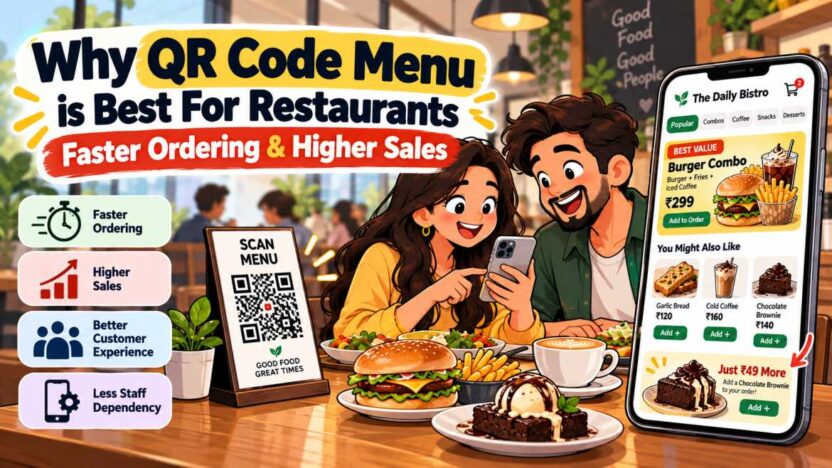
As soon as a customer taps on the cold coffee, the menu immediately appears below—”Add a Walnut Brownie with it for just ₹49.”
The customer doesn’t have to think; they simply press a button. This menu doesn’t just take orders, it also quietly extracts an extra twenty to fifty rupees from each table.
Without an app, an interface that loads in 1 second
Expecting customers to come to your cafe and download a 50 MB app is the biggest mistake. No one does this. When they’re hungry, people can’t tolerate even a two-minute wait.
The biggest advantage of a smart QR menu is this:
- Scanned the code on the table.
- The entire menu opened in the phone’s standard browser within 1 second.
- A smooth experience, just like Swiggy or Zomato, without the need to install any apps.
Browsing becomes so easy for customers that they can scroll through the entire menu without any irritation.
Real-time control: What’s sold out disappears instantly
Restaurants know the embarrassment it can cause when a popular dish runs out in the kitchen.
The waiter takes the order and goes to the kitchen, the chef yells, “It’s out,” then the waiter goes back to the table and apologizes. Ten minutes are wasted, and the customer’s mood is ruined.
With a smart menu, this headache is solved in a single click:
- Did the kitchen run out of cheese or special bread? Press a button on your phone or billing screen—that dish is instantly hidden from the menu.
- Did the chef prepare a new special soup this evening? Add a photo and price in two minutes, live at the top of the menu.
No reprinting costs, no need to apologize at the table.
Visual appeal: What’s visible is what sells.
Paper menus simply read: “Pesto Pasta – ₹280.”
Now, someone who doesn’t know about pesto won’t take the risk. They’ll just order the same old pasta in red sauce.
But when the actual photo of that pasta, hot and cheesy, appears on the screen, even the person who wasn’t in the mood for it will start salivating.
Also, the diet filtering is quite powerful. Some may want Jain food, others vegan or gluten-free. A filter is placed at the top of the menu, and the customer is shown only what they can eat. The hassle of asking the waiter for a long inquiry is over, the decision is instant, and the order goes straight to the kitchen.
How a Smart QR Menu Directly Increases Restaurant Revenue
Real revenue in a restaurant comes from two things: either increasing the bill for each table a little bit, or emptying the table quickly so new people can sit.
A Smart QR Menu isn’t just a decoration; it directly addresses both of these. When it’s activated on a table, the difference in revenue becomes clearly visible. Let’s see how it actually makes money.
Automatic Upselling: ₹50-100 Extra on Every Bill Without Hesitation
No matter how good a waiter is, they can’t simply tell every customer, “Sir, please take fries and a brownie too.” Sometimes the waiter hesitates, or in a rush, forgets to ask.
But the screen never forgets.
As soon as a customer taps on the burger, a clear option will immediately appear on the screen: “Add Peri-Peri Fries & Cold Drink for just +₹69.”
The customer feels that it’s better to get the combo for ₹69 than to buy fries separately for ₹120. Without any pressure from the waiter, he manually increased the bill size. Similarly, when he chooses hot coffee, a fresh muffin suggestion appears below. These small extras make a difference worth thousands at the end of the day.
No fear of being judged, open customization
Few owners understand this. Many customers hesitate to ask for extras in front of the waiter—they think it will look awkward or they will judge.
But there’s no one watching the phone screen.
There, people choose options freely:
- “Double Cheese (+₹40)”
- “Extra Bacon / Paneer (+₹60)”
- “Oat Milk Swap (+₹50)”
Customers get what they want, and their Average Order Value (AOV) automatically increases by 15 to 20% without any salesperson nagging.
Faster Table Turnover: Saving 15 Minutes Means More Revenue
On weekends, when there’s a line outside, the biggest loss is the time spent sitting at a table while people are idle, waiting.
What happens in the old system?
A person sits down… After 5 minutes, the waiter brings the menu… Spent 10 minutes reading… Then waved the waiter over… Placed the order. 20 minutes wasted just placing the order.
Smart QR menus eliminate this entire charade:
- The customer scans as soon as they sit down.
- In 2 minutes, they scroll through and punch in their order.
- The order is sent directly to the kitchen printer.
A table that used to take 60 minutes to empty now becomes free in 45 minutes. This means that during peak lunch or dinner hours, you can serve 20-30% more customers in the same space. More table rotation means more cash.
Reduced staff burden and the hassle of incorrect orders is eliminated.
In a noisy restaurant, when a waiter eavesdrops on orders, mistakes are common. The customer asked for pasta without onions, but the waiter wrote down extra onions. The food was sent to the table, the customer got angry, the food was wasted, and the restaurant was disgraced.
When the customer manually selects and places an order on their phone, there’s no question of confusion.
The waiter no longer needs to carry a pen and diary to jot down orders. He can focus his attention on ensuring that the food arrives hot and quickly at the table, and that the water glass remains empty. Service quality improves, staff are relieved of unnecessary stress, and customers leave with a smile.
Must-Have Features to Look for in a Restaurant QR Code Menu
Dozens of companies are circulating the market, claiming their QR menus are the best. But honestly, 80% of them are just a gimmick—they just slap colorful buttons on the screen, but when rush hour arrives, the system hangs.
If you’re choosing a system for your restaurant, before investing, make sure it has these five basic features:
Direct connection to KOT and POS software
This is the most important feature. Without it, any QR menu is incomplete.
As soon as a customer presses ‘Order Now’ from their phone at the table, the order should be generated as a KOT (Kitchen Order Ticket) directly on the kitchen printer without any delay. It should also be added to the bill on the counter computer.
If your waiter has to look at the customer’s phone and then retype the order into your billing software, then there’s no point in using QR. Instead of reducing the work, it will double it.
Easy Modifiers and Add-ons
Everyone has their own taste in food. Some may want it less spicy, some may not want extra onions.
Choosing these things on your digital menu should be a breeze:
- Size selection: Regular or Large?
- Spice level: Mild, Medium, or Extra Spicy?
- Toppings and add-ons: Extra cheese, mushrooms, or almond milk?
When these options are clearly displayed on the screen, customers are more likely to tick their preferences. The kitchen receives clear instructions and the table earns extra money.
Customer Insights and Preference Recognition
An intelligent system is one that recognizes long-time customers.
Imagine a person visiting your cafe for the third time in a month. As soon as they scan the QR code, they see at the top of the menu—”Welcome back! Order your favorite Cold Coffee again?”
He didn’t even need to browse the entire menu; his regular order was placed in one click. This small gesture makes the customer feel very special and becomes a loyal fan.
Direct Google Review Link with Billing
No matter how much you plead, no one leaves a review for your restaurant at home. Whatever needs to be done needs to be done at the table.
As soon as a customer finishes their meal and sees the bill on the screen, a cute prompt should appear below: “Did you like the food? Give 5 stars on Google in a second!”
The customer taps that button and is taken directly to your Google Business Profile. When this becomes so easy, 50-100 new positive reviews automatically start getting added each month.
Complete Payment Freedom (UPI, Card, or Cash)
Staying for 10 minutes after a meal, just waiting for the bill and card machine, is the biggest mood-spoiler.
A good QR menu should include the option to pay directly from the table using Google Pay, PhonePe, or Paytm. The customer eats, scans the QR code with their phone, pays, and leaves with ease. And yes, for those who prefer to pay in cash, the “Pay at Counter” option should also be available to avoid inconvenience.
How to Implement QR Menus on the Floor
No matter how great a QR menu you have, if it’s not properly displayed on the table and the staff isn’t able to explain it, it can ruin the whole thing.
What do restaurant owners often do? They stick a cheap sticker on the corner of the table. Within two days, the sticker peels off, gets stained with water and oil, and looks untidy. Then the customer complains, “What a hassle!”
If you want people to happily scan QR and avoid confusion, implement it on the floor like this:
Keep the presentation on the table clean and classic.
Stop putting those peeling stickers on the table.
Use clean acrylic stands (T-stands) or small wooden blocks instead. If the cafe’s atmosphere is a bit vintage or cozy, wooden stands look great. The stand should be immediately visible to customers, but not obstruct the placement of their plates.
Also, just use QR. Don’t just print the code and leave it.
No one will understand what to do with it just by looking at a black and white code. Write in clear letters directly above or below the code:
“Scan here to view menu & order in 30 seconds.”
Customers will immediately know what the scan will do and how long it will take.
Make staff customers’ guides, not salespeople.
Installing a QR menu doesn’t mean your staff has to stand around with folded hands.
When a new family or couple arrives and sits down at a table, the waiter should smile and say, “Hello, sir! You can view our full menu with photos by scanning the stand on the table. If you have any trouble understanding anything, I’m here.”
Especially when an elderly person or someone who isn’t comfortable using a phone arrives, don’t force it on them. The waiter should step in and help them. When a customer feels a sense of belonging, they don’t get irritated, but rather feel a sense of belonging. Enjoys learning.
Hybrid Rule: Always keep a few paper menus ready.
Technology is one thing, but common sense is another.
Sometimes someone’s phone might be discharged, someone’s internet might be slow, or an elderly person might come alone and only want to see a paper menu.
Always keep 3-4 clean, new, and laminated menu cards ready at the counter for such occasions. As soon as you notice someone having trouble with their phone, smile and hand them the card.
The goal is to feed them and send them away happy, not to force your technology on them.
The Smarter Way Forward: Introducing Hyperr Volt
If you still think that simply placing a simple digital leaflet on the table will do the trick, you’re doing your restaurant a huge disservice every day. A QR code on the table shouldn’t just be there to show you what’s on sale. It should be there to quietly drive business for you.
This is where Hyperr Volt makes a huge difference.
Hyperr Volt creates a silent, superfast sales engine without disrupting your existing billing and kitchen setup. You don’t have to throw out your old computer or deal with a heavy software migration. It integrates seamlessly with your old thermal printer and POS.
How does Hyperr Volt stand out?
Customer-Customer Menu: When someone scans with a phone, it doesn’t just display a lifeless list on the screen. It understands on the backend which combos are most popular and which items generate the highest margins for you. Those dishes automatically appear.
Automatic Combos and Add-ons: Upon selecting a burger or pizza, the screen automatically displays the correct value combo of drinks and sides. Customers can add two extra items to their bill without any pressure from a salesperson.
Boost in Local Search and Google Reviews: As soon as the meal is finished, a one-tap link to a 5-star review opens directly on the bill screen. Within a month, your Google Business Profile will be filled with positive reviews from real customers without paying any agency.
Direct WhatsApp Engagement: Instead of annoying spam messages, old customers receive accurate updates about their favorite dishes and seasonal deals directly to their phones, drawing them back to your table.
At the end of the day, the bottom line is to reduce staff pressure, ensure that orders come out of the kitchen without errors, and increase the turnover from each table by 15 to 20%. Hyperr Volt does exactly this without any unnecessary drama.
Ready to modernize your dining experience? Discover how Hyperr Volt helps restaurants cut ordering delays and grow order value today.
Frequently Asked Questions (FAQ)
Do customers actually prefer QR code menus over physical menus?
These days, most young people and office workers prefer to view menus on their phones. The reason is clear—they see real photos of the dishes and clearly understand the prices. But, not every customer is the same. Some older customers or family members still prefer to hold a paper menu. That’s why we should place a smart QR code on the table, but also keep 2-3 clear printed cards at the counter.
Will a QR code menu replace our waitstaff?
Absolutely not. This isn’t to fire staff, but to reduce their headaches. A waiter’s job is to be hospitable and attend to tables, not to stand around with a pen and paper. When the phone handles ordering, the waiter can focus on serving hot food and improving service without any hassle.
What happens if a customer doesn’t have an internet connection or smartphone?
This is quite normal—sometimes someone’s phone doesn’t have network, or sometimes the battery runs out. There’s no need to insist. Write your cafe’s Wi-Fi password on the table stand. And if someone doesn’t want to use their phone, smile and hand them a clearly printed menu from the counter.
Do I need to replace my existing POS software to use a smart QR menu?
Absolutely not. If a salesperson asks you to ditch your old billing system to use our QR, refuse immediately. A smart system like Hyperr Volt integrates directly with your old billing computer and your kitchen thermal printer. Work starts the next day without any unnecessary expense.
How does a QR code menu help in collecting Google reviews?
No one writes a review of your shop after arriving home; they’ll do it right there on the table. In the Smart QR menu, as soon as a customer’s bill appears on the screen, a clear button appears below—”Did you like the food? Give it 5 stars on Google in one click!” The customer simply clicks the 5-star button in a second, right there on the spot. Within a month, you’ll accumulate a ton of genuine reviews without any agency involvement.