If you run a café, dine-in, or breakfast outlet, you know one thing all too well: delivering menu cards to tables and taking orders during the lunch or dinner rush can be a daunting task. Sometimes a menu card gets torn, sometimes sauce or coffee spills on it, and if the chef increases the price of a dish by $1 or $2, it can cost hundreds of dollars to reprint the entire menu.
In today’s world, when every customer has a smartphone, displaying your dishes directly on their phone instead of leaving bulky laminated cards on your table is a smart move. That’s why smart restaurant owners are now adopting the simple method of creating a QR code menu for restaurants. When you create a modern online menu with a QR code for your outlet, customers can browse the menu themselves as soon as they sit down.
But simply displaying a simple menu isn’t enough. Customers should also see your special combos, the latest discounts, and tasty dishes in a timely manner. If you’re wondering how to easily start this for your business, Hyperr Cafe is a very straightforward and practical way. In this guide, we’ll explain step-by-step how to use Hyperr Cafe to create your own smart digital QR menu, so your staff can handle the task without any hassle and customers can enjoy ordering.
What Is a QR Code Menu for Restaurants?
Simply put, it’s the same list of dishes that used to be printed on paper or cardboard, only now it exists digitally behind a tiny code. Scanning a small stand on the table reveals your entire kitchen on the customer’s phone screen.
These days, almost every smartphone has the ability to scan codes simply by opening the camera. Customers don’t need to download a bulky app. When an owner decides to create a QR Code menu for their restaurant, they’re essentially providing their customers with a fast and seamless dining experience.
How a Restaurant QR Code Menu Works
The way a modern QR code menu for restaurants works is very simple and hassle-free:
- Scanning: A customer sits down at a table and uses their phone’s camera to scan a code on a table stand or sticker.
- Browsing: Scanning opens a clean web page, displaying all your categories, such as starters, burgers, shakes, and main courses.
- Selection and Ordering: The customer selects their favorite dishes, views their photos and prices, and submits their order from there.
Your staff doesn’t have to constantly run around with menu cards. The waiter only goes to the table when they need to serve food prepared in the kitchen or ask for water. A proper QR code menu system reduces the workload on the entire floor.
QR Code Menu vs. Traditional Printed Menu
The biggest problem with old paper menus is that they don’t change. For example, if the kitchen runs out of bacon or cheese today, or they have to stop making special shakes that evening, the waiter has to go to each table and inform them that the item is out of stock. This can quickly spoil the customer’s mood.
The second issue is cost. The prices of vegetables, meat, bread, and packaging fluctuate every 3-4 months. If you simply want to increase the price of a cold brew from $4 to $5 on a printed menu, you either have to make a lot of redactions with a pen, which looks awful, or pay the full printing bill.
In contrast, when you choose a digital tool to create a QR menu for a restaurant, you can change prices in just a few seconds from your mobile or laptop, hide out-of-stock items, and add new starters whenever you need them. No printing costs, no redactions.
| Traditional Printed Menu | Hyperr Cafe Digital Menu |
|---|---|
| High recurring printing costs | Zero printing costs — update your menu instantly from your phone |
| Awkwardness when informing customers about out-of-stock items | Hide or unhide items with a single click |
| Customers wait for a waiter to see the menu | Customers scan the QR code and browse the menu as soon as they sit down |
| Staff spend time taking and noting orders | Customers place orders themselves, while staff focus on serving |
Basic QR Menu vs. Hyperr Cafe Smart QR Menu
Many people in the market make a mistake. They go to any free website and upload a PDF of their old menu and extract its code.
This basic method is very cumbersome. When a customer opens the PDF, they have to zoom in and out with their fingers. Reading the fine print on a small phone screen is very tedious. Furthermore, it’s just a picture—a customer can’t place an order directly from it, nor can they see any special offers.
Hyperr Cafe’s smart menu isn’t a simple PDF file. It’s a fully functional digital QR menu. The menu automatically adapts to the size of the mobile screen. By clicking on a category, customers can directly access their dish, view photos, and place their order from there. When you complete the create qr menu for restaurant process with Hyperr Cafe, you get a dynamic system that helps you grow your business.
Why Choose Hyperr Cafe to Create a Digital QR Menu?
If you’re looking for a simple and robust system, Hyperr Cafe is perfect for small cafes to large dine-in restaurants. It’s not just a code generator, but a tool to manage both your restaurant’s sales and service.
Display Your Restaurant Menu on Customers’ Smartphones
Customers nowadays want to feel comfortable at their table. No one likes to fumble for a menu card or wait for a waiter to be free.
With Hyperr Cafe, your menu opens directly on customers’ phones with a modern, clean look. The fonts are so clear that they’re easy to read, even in dimly lit cafes. Customers browse the menu at their own pace, significantly enhancing their dining experience. If you’re considering making your business tech-friendly, creating a QR menu for a restaurant with Hyperr Cafe is the first step.
Manage Food Items, Categories, and Prices
Not every day is the same in the kitchen. Sometimes raw materials aren’t available, or sometimes the chef wants to make a special dish on the weekend.
From the Hyperr Cafe dashboard, you can easily control all your dishes:
- Change the price of any item at any time, for example, changing the price of a burger from $8 to $9.
- Immediately turn off items that run out in the kitchen to prevent incorrect orders.
- Designate breakfast, lunch, and dinner categories distinctly and clearly.
When you set up your create QR menu for a restaurant this way, there’s never any misunderstanding between your kitchen and floor staff.
Showcase Combo Offers and Discount Deals
If you’re selling just one burger for $7, customers often skip fries or a soda. But if the menu says “Burger + Fries + Coke for only $11,” customers immediately think it’s a bargain.
At Hyperr Cafe, you can easily showcase such combos and special discounts at the top. A great QR code menu for restaurants is one that clearly shows customers the best deals, encouraging them to try more variety.
Help Customers Discover More Food Options
People often order the same 2-3 items they already know from a printed menu, as it can be overwhelming to find new items on an 8-page menu.
Hyperr Cafe’s digital QR menu features clear pictures and concise descriptions of dishes. As soon as a customer sees a good picture of your signature dish, they’re tempted to try that new dish. This can also help sell items on your menu that might not normally be noticed.
Explore Customer Order History and Food Recommendations
As orders come into the system, you’ll learn what people are enjoying most at your cafe. Which shakes are selling best? Which soups are the least popular?
Hyperr Cafe understands this data to help you display relevant menu recommendations. If a customer chose pasta, the system might suggest garlic bread. When you create a QR menu for a restaurant using Hyperr Cafe, these small details can significantly improve order value without the slick salesman-like chatter.
How to Create a QR Code Menu for a Restaurant Using Hyperr Cafe
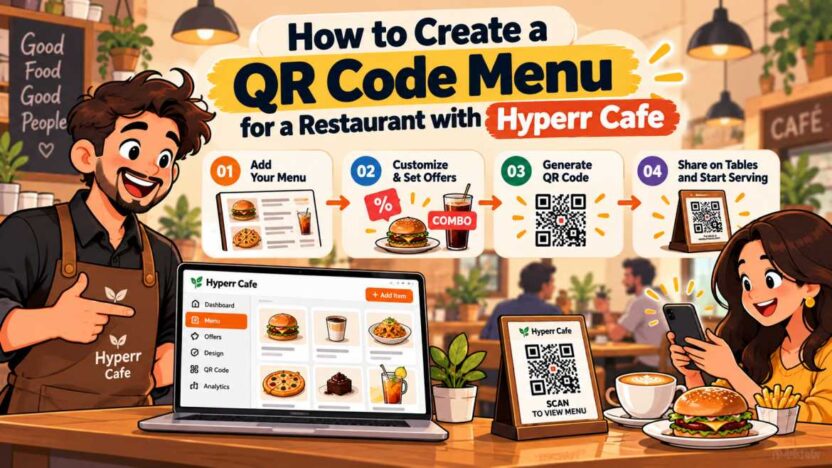
Now let’s get to the most important part. If you need to set this up for your restaurant, it’s a simple task, complete in less than half an hour. You don’t need any coding or developer skills.
By following the steps below, you can easily make your own online menu live with a QR code:
Step 1 – Set Up Your Restaurant on Hyperr Cafe
First, you need to register your restaurant on the Hyperr Cafe platform. When you start creating a QR menu for a restaurant, these basic details are crucial:
Enter the correct name, complete address, and contact number of your restaurant or cafe.
Upload your store’s logo so that customers see your brand when they open the menu.
Set your outlet’s opening and closing times.
This basic information will appear on the header of your digital menu, assuring customers that they’re viewing the menu at the right place.
Step 2 – Add Your Food Menu and Categories
Once your profile is created, structure your menu. Don’t put all the food in one long list, or it will be difficult to find. A good, user-friendly QR menu is always divided into clear categories.
Divide your menu into simple categories:
- Hot and Cold Beverages
- Starters and Finger Food
- Main Courses and Sizzlers
- Pizzas, Burgers, and Sandwiches
- Desserts and Shakes
The clearer the categories, the faster customers will find what they’re looking for.
Step 3 – Add Food Images, Descriptions, and Prices
Now start adding your dishes within each category. This is a crucial step when creating a QR menu for a restaurant:
- Dish Name: Keep the name clear (e.g., “Cheesy Smoked Burger”).
- Price: Enter the final dollar amount you charge customers (e.g., $8.50 or $12.00).
- Short Description: In 1-2 lines, describe what’s special about the dish (e.g., “Grilled patty, with crispy lettuce and in-house smoky sauce”).
- Photos: Upload clear photos taken with your phone in good lighting. Avoid using overly fake or fabricated photos from the internet; customers want to see what’s actually on their table.
Step 4 – Configure Combos, Offers, and Discount Coupons
If you have a special meal deal, set it up here. Such as a weekend combo, lunch special bowl, or 10% off a bill over $40.
You can easily create combos from the Hyperr Cafe dashboard. When you add such deals during the create QR menu for restaurant process, these offers get a prominent place on the menu, making them the first thing customers see when ordering.
Step 5 – Generate and Test Your Restaurant QR Code
Once all the menu items are complete, generate your unique QR code from the dashboard.
It’s important to test it before printing:
- Try scanning the code on the screen with your phone.
- Check by opening it on a different brand of phone (e.g., once an Android and once an iPhone).
- Check that all items, their prices, and photos are loading correctly.
Step 6 – Print and Place the QR Code on Restaurant Tables
Now download this code and print it in high quality. Here are some practical ways to display it at your outlet:
Acrylic table stands are best, as spills of water or sauce on them won’t damage the code.
If the tables are small, you can also stick a laminated sticker on the corner of the table.
Be sure to place one or two stands at your billing counter and pick-up counter so that takeaway customers can also view the menu.
Step 7 – Test the Complete Customer Ordering Experience
After placing the QR code on the table, pretend to be a customer.
Scan the code, add two dishes to your cart, and place your order.
See how long it takes for the order slip or notification to reach your staff or kitchen display system.
Is the staff having any trouble understanding the order?
Then go to the counter and check the payment flow.
Once you’ve tested the entire round yourself, you’ll be satisfied that your mission to create a QR menu for a restaurant was a complete success.
How Hyperr Cafe’s QR Code Menu Ordering System Works
Many restaurant owners think that installing a digital system will overcomplicate their daily operations. In reality, this isn’t the case. Hyperr Cafe’s setup simply makes things a little faster and easier without changing your current process.
If you’re interested in introducing restaurant QR code ordering at your outlet, here’s how it all works:
A simple, seamless ordering experience for customers and restaurant staff.
1. Scan the QR Code
The customer scans the QR code placed on the table.
2. Browse the Digital Menu
The menu opens on the customer’s smartphone, where they browse dishes and add items to the cart.
3. Place the Order
The customer reviews the cart and taps the “Place Order” button.
4. Order Reaches the Staff or Kitchen
The order is received by the staff or kitchen screen along with the table number.
5. Food Is Prepared and Served
The kitchen prepares the order, and the staff serves it at the customer’s table.
6. Enjoy the Meal and Pay at the Counter
The customer enjoys the meal and pays the bill at the counter.
Customers Scan the QR Code and Browse the Menu
As soon as a customer takes their seat, they scan the code on the stand in front of them.
The entire menu opens directly on their mobile screen without the need to install any apps. They can easily browse different sections—for example, if they only want a shake, they can simply click on “Beverages” to view all the shakes at once. A smooth QR code menu ordering system eliminates any waiting time for customers.
Customers Select Food Items and Place Orders
Customers simply add the food they like to their cart by pressing the “+” button. If a dish requires customization (such as “extra dip” or “less spicy”), they can also easily select it.
After selecting everything, they check the table number and send the order directly from their phone. When restaurants adopt QR code ordering, the hassle of dictating orders to a waiter—like a customer saying “gluten-free” and the waiter forgetting to type—is completely eliminated.
Restaurant Staff Receive and Process Orders
As soon as a customer submits an order, a notification immediately appears on your counter or kitchen device (tablet, phone, or computer).
It clearly states: Table No. 3, 1 cheeseburger ($8), 1 onion rings ($4), 1 iced latte ($5).
The kitchen staff immediately begins preparing the food without any confusion. This saves time punching in orders and ensures faster delivery to the table. Therefore, creating a QR menu for a restaurant is a very wise move for any busy cafe.
Customers Pay at the Counter
This setup in Hyperr Cafe is primarily designed to display menus and streamline ordering. In many systems, customers are asked to pay online as soon as they place their order, which makes many people hesitant—because the food hasn’t even arrived on the table yet, and the payment has already been deducted.
There’s no such hassle here. After finishing their meal, the customer simply goes to the counter. There, your cashier issues the final bill for their table number, and the customer can pay by cash, card swipe, or digital wallet, depending on their convenience. This way, even after creating a QR menu for a restaurant, your existing billing system continues to function smoothly without any changes.
How Hyperr Cafe Helps Restaurants Promote Combos and Discount Offers
The biggest player in the restaurant business is average order value. If someone comes in just for a $4 coffee and you can get them a $3 croissant or muffin, it can make a huge difference to your daily sales. But a waiter can’t go to every table and force-feed the dishes.
When you create a QR menu for a restaurant through Hyperr Cafe, the digital menu handles this task beautifully.
Showcase Food Combos on the Digital Menu
When someone opens the menu in the evening and the first thing they see on the screen is: Afternoon Special—Hot Cappuccino + Grilled Cheese Sandwich for just $9 (separately $12), their mind immediately goes to that.
In Hyperr Cafe, you can highlight such combos beautifully. When two items are offered together at a single price, customers perceive it as value for money and order the combo directly instead of considering each one separately.
Promote Deals and Discount Coupons
If your cafe is less crowded on Tuesdays or Wednesdays, you can put up a special discount banner for that day.
As soon as a customer scans the code, they’ll see: “15% off all pizzas today.”
You can’t run such offers daily on a paper menu, but when you use a smart digital platform to create a QR menu for your restaurant, you can turn the offer on and off whenever you want.
Encourage Customers to Explore Additional Dishes
When a customer is scrolling through their menu with their phone in hand, they’re more likely to view the menu with ease.
If you’ve properly positioned your side dishes—like cheese dips ($1.50), peri peri wedges ($4.00), or extra toppings—on the menu, people often add a side item to their cart along with their main dish. This is a huge advantage of restaurant QR code ordering.
Improve Food Discovery During the Ordering Journey
Sometimes your chef makes a great soup or unique mocktail, but the waiter always recommends the same old cold drink or plain burger.
A digital menu gives every dish an equal opportunity. When customers scroll through the screen, they’ll see unique dishes that the waiter might never mention. This showcases the true variety in your kitchen.
How AI-Based Food Recommendations Improve the Hyperr Cafe Menu Experience
These days, technology is so intelligent that it helps understand customer preferences. Just as relevant items are displayed when shopping on major e-commerce sites, smart recommendations are now also implemented on food menus. When you set up a create QR menu for a restaurant with Hyperr Cafe, you automatically get this modern feature.
Recommend Relevant Food Items
When a customer adds spicy chicken wings to their cart, a small suggestion may appear immediately below: “A cold beer or chilled lemonade ($3.50) would go great with this.”
This isn’t an annoying pop-up, but a natural suggestion. Most people enjoy a cold drink with spicy food, and when it appears on the screen, customers add it without much thought.
Use Available Order History for Personalization
The system gradually learns what people like to order with each dish.
If your cafe’s data shows that 60% of people order pancakes with extra maple syrup and espresso, the system will start suggesting that combination to new customers. So, when you create a QR menu for a restaurant, this smart menu flow helps increase your sales.
Help Customers Discover Complementary Dishes
People often choose the main dish but forget to consider dessert.
When the order finalization page comes up, a small, gentle reminder can be provided: “Hot fudge brownie with vanilla ice cream ($5.00) after the meal?” Many people who weren’t in the mood for dessert will see it and add it to their order.
Make Digital Menu Browsing More Relevant
Customers save time by getting recommendations tailored to their preferences, rather than displaying 50 unnecessary items at once. A modern QR code menu system makes the menu browsing experience much easier and more enjoyable, rather than tedious.
How to Make Your Hyperr Cafe QR Menu User-Friendly
Just installing the system isn’t enough; you need to design your menu so that any customer can use it without hesitation. When working on creating a QR menu for a restaurant, keep these important things in mind to ensure your menu becomes a truly user-friendly QR menu:
Use Clear Food Categories and Descriptions
Don’t make your dish names too complicated. If you’re looking for an Italian or French dish whose name is unfamiliar to the general public, clearly state the ingredients below.
Don’t make the categories too long. 6 to 8 main categories are enough for the entire menu. A truly user-friendly restaurant QR menu is one where customers can understand what they’re looking for within 3 seconds.
Keep Menu Prices Updated
If you’ve marked a dish at $14 at the counter, but it still shows as $12 on the menu, you’re bound to have an argument with the customer during billing.
The biggest advantage of a digital system is its instant updateability. So, once you’ve set up a create QR menu for restaurant on Hyperr Cafe, you can correct it instantly by going to the dashboard whenever the kitchen changes its price.
Use High-Quality Food Images
Photos that are blurry, too dark, or taken from odd angles can ruin the overall look of a menu.
Take photos with your phone, placing the plate on your own table in daylight. The food should look fresh and clean. There’s no need to apply heavy filters; show the food as it actually appears so that customers won’t be disappointed when it arrives.
Make the QR Code Easy to Scan
The code on the table should be such that the customer can scan it from their chair without bending over:
- Make sure the code is at least 2.5×2.5 or 3×3 inches in size.
- Place the code in a place away from direct glare from a table lamp.
- If the sticker is bent or scratched, replace it immediately with a new one.
Keep the Customer Ordering Process Simple
The ordering process should be straightforward. Don’t ask the customer for 10 things like their name, email address, and date of birth as soon as they scan. They’re here to eat, not fill out a form.
Scan ➔ View the menu ➔ Choose an item ➔ Place an order. A true digital QR menu is one that minimizes the distance between the customer and their food.
Frequently Asked Questions
How Do I Create a QR Code Menu with Hyperr Cafe?
It’s very easy. Simply sign up with Hyperr Cafe, create your restaurant profile, add your dishes and their dollar rates. Then download your code from the system and place it on your table. This way, you can quickly complete the process of creating a QR menu for your restaurant.
Can I Update My Restaurant Menu After Creating a QR Code?
Yes, absolutely. You don’t need to print a new code repeatedly. Just go to the dashboard on your phone or laptop and change the rate or add a new dish, and it will automatically update with the same old code.
Can Customers Place Orders Through the Hyperr Cafe QR Menu?
Yes, customers aren’t limited to just viewing the menu. They can add their favorite dishes to their cart and submit orders to the kitchen directly from there, making your restaurant QR code ordering system run much smoother.
Does Hyperr Cafe Support Online Payments?
No, in this setup, all payments are made at the counter. Customers simply order from the digital menu, and after eating, they can pay their final bill at your counter using cash, credit card, or any other digital method.
Can I Display Combos and Discount Offers on My QR Menu?
Absolutely. You can display as many meal combos, special weekend deals, and discount coupons as you like on your menu. These are clearly visible at the top of the menu so customers can see them immediately.
Does Hyperr Cafe Charge a Monthly Subscription Fee?
No, there’s no monthly subscription or fixed rental fee. It operates on a model of a 2% transaction fee on processed orders, eliminating unnecessary fixed costs for small cafes.
Can Hyperr Cafe Work Alongside My Existing POS?
Yes, very convenient. Because all payments are collected directly at your counter, your cashier can easily punch orders into your existing POS system or billing machine.
Create a Smarter Restaurant Menu with Hyperr Cafe
Running a restaurant is a hectic business. Menu cards that get torn, printing bills when rates change, and misunderstandings between waiters and customers when noting orders can make your job even more difficult.
The true benefit of technology is that it reduces your daily headaches. When you choose to create a QR menu for a restaurant correctly, your entire floor management becomes easier. With Hyperr Cafe, you can give your outlet a modern and smart look today, without any significant expenses or fixed rentals. Put a clear code on your tables, give customers complete freedom to view their dishes, and let your staff focus on providing excellent service instead of noting orders.
If you too want to make your dining service easier and faster, get started today and create a great digital menu for your outlet.